Generative Invaders

Post I.T. Shooter is small indie game by Kloonigames (run by Petri Purho, a computer science student in Finland, who each month creates a new indy game in seven days).

Unique aesthetics combined with a nice soundtrack, and randomly generated invaders!

The invader generator was inspired by Jared Tarbell’s Invader Fractal algorithm. Be sure to also check out Dave Bollinger’s Pixel Robots – also inspired by Tarbell’s work.

Structure Synth 1.0 (“Potemkin”) Released

I’ve released version 1.0 of Structure Synth.

The biggest new feature is the new Template Export GUI, which I described in a previous post. Template Export GUI highlights:

  • Shows the defined primitives in the template (highlighting used and missing ones).
  • Integrated XML editor with syntax highlighting for quickly modifying the template.
  • Automatic unique filename generation.
  • Quickly set output width and height.
  • Optional post modification window allows you to modify the output before saving.

Other new features:

  • Added a ‘Recent files’ menu entry.
  • Optional (and experimental!) depth-first recursion (using ‘set recursion depth’). This can be useful for constructive solid geometry.
  • Added an application icon.
  • Support for a new generic ‘template’ primitive

The template XML syntax has been slightly modified, and is no longer compatible with the previous format:

  • A new ‘description’ element has been introduced.
  • The ‘substitution’ element is now called ‘primitive’ (so you need to rename elements of this type).
  • Added ‘defaultExtension’ tag (for automatically suggesting file extension).
  • Added ‘runAfter’ tag (for setting a default application to spawn).

Binaries for Windows (XP and Vista).
Mac binaries (Universal build).
Linux is still source only, but if you are on Debian or Ubuntu, keep an eye out for the ‘structure-synth’ package – it will be updated to 1.0 at some point.

UPDATE 11 July: Mac binary now available.

Download at SourceForge.

Template Export GUI

I’ve added a Template Export Dialog to Structure Synth. This greatly simplifies the workflow when working with Structure Synth models.
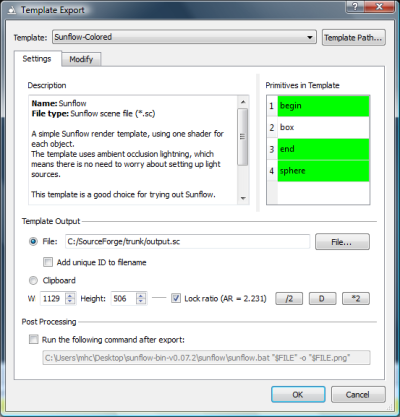
The Template Export Dialog.

The Template Export Dialog makes it possible to browse the available templates, and see which primitives are defined in the template. The green primitives are the ones actually used in the EisenScript. If the EisenScript contains primitives not defined in the template, they will be listed as red items.

The Template Output section specifies the output filename. The default extension can be set in the template XML file (using this new defaultExtension attribute, e.g.: defaultExtension=”Sunflow scene file (*.sc)”). It is possible to automatically add a counter to the filename, to ensure that an unique file is created.

The output width and height can be changed from the dialog. The ‘/2′, and ‘*2′ buttons halves and doubles the output size, while the ‘D’ button sets the size to the size of the OpenGL window.

The Post Processing section makes it possible to specify a file with arguments, which is run after the output has been created. The $FILE$ marker will be substituted for the actual output filename before starting the process. Of course the path to the executable must be changed before using this.
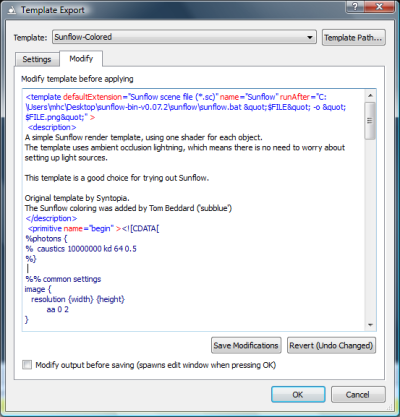
It is also possible to directly modify the XML template before applying it (notice the syntax highlighting!) – this makes it easy to try out script variations. Even the final output can be modified before saving it as a file or copying it to the clipboard.

There has been a few changes to the template XML file format in order to accommodate these changes. The ‘defaultExtension’ and ‘runAfter’ tag was added, a new ‘description’ element has been introduced, and finally the ‘substitution’ element has been renamed to ‘primitive’.

The Template Export GUI will be part of Structure Synth V1.0, which I hope to release this week before I leave for my vacation.